

Local Business Schema Markup Made Simple: Master Local Business Schema Markup
This statistic means half of all people looking for something on Google want local results! Local business owners have a great chance to reach these customers – if they can outshine their competition. Local business schema markup could be your hidden advantage. Businesses that use schema markup see their click-through rates jump by up to 40%, getting more eyes and clicks on their content.
The numbers tell an interesting story. Schema markup appears on 72.6% of websites that rank on Google’s first page, that indicates its importance for top-performing sites. Rich results from schema markup grab 58% of user clicks, while regular results only get 41%.
But what exactly is local business schema markup? It helps search engines understand your business details like name, address, and hours. This increases your chances of showing up in rich snippets and search results. Your listings become more eye-catching and useful, which brings more potential customers to your business.
Let’s take a closer look at how you can use schema markup to improve your local SEO results. We’ll cover everything from picking the right schema type to testing your setup.
What is Local Business Schema Markup?

Local business schema markup is a special code format that helps search engines better understand and show your business information online. Business owners often focus only on keywords and content, but this powerful behind-the-scenes tool gives important details about your local business to search engines.
What is Local Business Schema Markup?
Local business schema markup is a standard code format that gives search engines specific, structured information about your local business. This special markup acts like a translator between your website content and search engines. It helps them understand details like your business’s name, address, phone number, operating hours, and more. It’s also a subtype of both Organization and Place schema and inherits properties from these categories.
Schema.org, a collaborative, community-driven project, provides a collection of shared vocabulary—known as schemas—that webmasters can use to structure metadata on their websites. The proper implementation of this markup lets search engines display rich results that can improve your business’s online presence.
Difference between schema and structured data
People often use these terms interchangeably, but structured data and schema are different concepts:
Structured data is the format used to organize and describe information on a webpage. This broader concept standardizes information to make it easier for search engines to interpret your content. Think of structured data as a language that lets you communicate with search engines better.
Schema is the specific vocabulary used within structured data markup. Google, Bing, Yahoo, and Yandex launched Schema.org in 2011 through a joint initiative. It provides standard terms and properties that give meaning to your structured data. Schema works like a dictionary that defines the words you can use in your structured data language.
The relationship works this way: structured data is the format, and schema is the vocabulary used within that format. When you implement local business markup, you use Schema.org vocabulary within a structured data format (typically JSON-LD).
How schema helps search engines understand your business
Search engines are smart but need help understanding context and specific details about your business. Schema markup helps in these ways:
Enhanced interpretation: Schema markup works as a translator that converts your website’s content into a format search engines easily understand and classify. You tell them exactly what your content means instead of letting search algorithms guess.
Contextual clarity: Businesses that embed schema markup into web pages give search engines structured data that improves search results’ accuracy and relevance. To name just one example, schema could help your business show up for “bakery New Orleans,” even if those words don’t appear in your listing.
Eligibility for rich results: Local business schema makes your site available for enhanced search features called rich results. These include:
Knowledge panels with business details
Business carousels for local searches
Star ratings from customer reviews
Opening hours displayed directly in search results
Business photos
Price range indicators
Voice search optimization: Schema markup ensures your business information is available through voice search, which continues to grow.
AI compatibility: Structured data helps AI-powered platforms—like ChatGPT and Google’s AI features—better interpret and summarize your website content. One experiment showed that pages using schema markup appeared more often in AI-generated summaries. This suggests structured data helps these systems extract key business information better.
Schema markup doesn’t directly affect rankings, but it forms the foundations of a complete local SEO strategy by giving search engines clear, structured information about your business.
Why Schema Markup Matters for Local SEO

Image Source: GO-Globe
Schema markup has changed the game for local businesses that want to boost their digital presence. It goes beyond just describing what your business does. The right way to use schema markup brings real benefits that can change your local SEO results.
Boosts visibility in local search results
Schema markup works like a translator between your website and search engines. Google and other platforms can better understand your business’s offerings and location. Search engines can show your business details more accurately in local results.
Local business schema markup gives search engines clear, structured data about your key business information. Search engines trust and verify this data more easily, which makes your business more credible in search results.
Your business has a better chance to show up in the Local Pack with local business schema. This prime spot on search results pages shows nearby businesses. On top of that, it helps you appear more often in Google Search and Maps when people look for local services.
Search engines understand where your business operates better with the right schema setup. This helps you show up more when customers search for services near them. This matters a lot since local search competition is fierce.
Improves click-through rates with rich results
Rich results from schema markup get more clicks than regular listings. The numbers tell the story clearly.
The data speaks for itself:
Rotten Tomatoes added structured data to 100,000 pages and measured a 25% higher click-through rate compared to pages without structured data
The Food Network converted 80% of their pages to enable search features and saw a 35% increase in visits
Nestlé measured that pages showing as rich results have an 82% higher click-through rate than non-rich result pages
Rich results generally receive 58% of user clicks compared to 41% for non-rich results
Users see important details right in the search results – business hours, reviews, and service information. They don’t need to visit your website first. This extra context helps users make better choices about your business.
Supports voice search and accessibility
Voice search keeps growing, and schema markup has become crucial for local businesses. About 30% of global internet users now use voice assistants to search.
Speakable structured data makes your content ready for audio playback on Google Assistant devices. Users who ask about your type of business can hear your content through Google Assistant if you’ve marked it with speakable structured data.
Schema markup makes your content more available to users with disabilities. Assistive technologies can read your content better. You can show what accessibility features your business offers through specific schema properties like “accessibilityFeature”. This helps people with disabilities use your information more easily.
Schema markup gives local businesses a complete boost – better search visibility, more clicks through rich results, and content that works for all search methods and user needs.
Why Do you Need to Carefully Choose the Right Schema Type for Your Business?
Your choice of schema type plays a crucial role in how search engines interpret your business information. The right business category in your Google Business Profile works just like picking the appropriate schema type. This will give search engines a clear understanding of your business offerings and its place in the digital world.
Understanding LocalBusiness and its subtypes
LocalBusiness schema type are the foundations of businesses with physical locations. It’s a subtype of both Organization and Place, inheriting properties from each. This dual inheritance describes both organizational aspects and physical location details at once.
Schema.org vocabulary provides many more subtypes to classify businesses more specifically. Google’s guidelines make it clear: “Use the most specific LocalBusiness sub-type possible; to name just one example, Restaurant, DaySpa, HealthClub, and so on”. Search engines can better understand your business’s nature and services through this specificity.
Some common LocalBusiness subtypes include:
AutomotiveBusiness (with further subtypes like AutoRepair, AutoWash)
FoodEstablishment (with subtypes like Restaurant, Bakery, CafeOrCoffeeShop)
HealthAndBeautyBusiness (with subtypes like BeautySalon, DaySpa, NailSalon)
You can default to the more generic LocalBusiness type if these specific types don’t fit your business perfectly. All the same, even with a generic type, Product Ontology and Wikipedia references can add more clarity.
Matching schema type with your Google Business Profile
Your schema markup and Google Business Profile need consistency to succeed in local SEO. Search engines understand and showcase your business better when these two elements work together.
These practices will help:
Schema types should arrange with your business categories in Google Business Profile
Business details must match exactly across both platforms
Both should update together whenever business information changes
Your business identity becomes stronger across different search elements through this alignment.
When to use Organization vs LocalBusiness
Your business model and physical presence determine the choice between Organization and LocalBusiness schema types. Here’s a clear guide:
Use LocalBusiness (or its subtypes) when:
Customers can visit your location in person
Local search results matter to you
Use Organization when:
Your business runs without a physical storefront (e.g., e-commerce)
You provide services through house calls without a public office
Your business doesn’t target local customers specifically
Businesses with multiple locations need different approaches based on their website structure. Organization schema works best for homepages without specific addresses. Each location page should have separate LocalBusiness markup. These connect to the main Organization using either the parentOrganization or branchOf property.
A handyperson’s business offering plumbing, locksmith, and electrical services should use an array in their schema markup. The additionalType property doesn’t support LocalBusiness, so it’s not an option.
How to Create Local Business Schema Markup
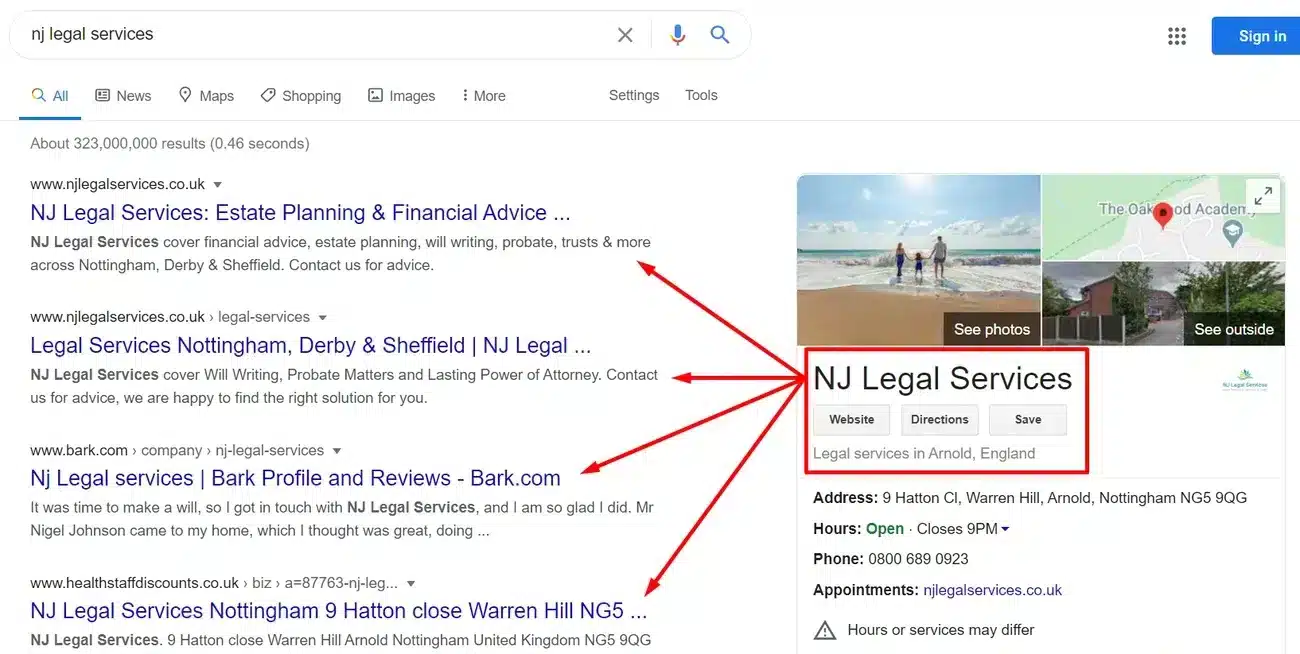
Image Source: Phil Isherwood
You don’t need coding expertise to create a simple local business schema markup. The right tools and understanding of key components help you build structured data that can boost your local search visibility.
Using a local business schema generator
The first step after choosing the right schema type is to generate the actual markup code. Several tools make this process simple for non-technical users:
JSON-LD generators – Tools like Microdata Generator, Merkle Schema Markup Generator, and Schema App JSON-LD Generator create properly formatted code without any coding knowledge. These generators are great because they reduce the risk of syntax errors that might flag your website as spam.
Google’s preferred format – Note that Google specifically recommends JSON-LD format over other options like Microdata. This JavaScript-based format is easier to use and maintain, which means fewer user errors.
Automatic latitude/longitude calculation – Advanced generators like Microdata Generator can figure out geographic coordinates from your address automatically. You won’t need to look up this information yourself.
Filling in required and recommended fields
Local business schema markup needs certain properties, while others are great ways to get rich results:
Required properties:
@id: A unique identifier for your business location that stays the same over timename: Your business name that matches your directory listings exactlyaddress: Your full physical location with street address, city, region, postal code, and country
Recommended properties:
@type: The specific business category (be as detailed as possible)telephone: Your business phone number with country and area codeslogoandimage: URLs of your business logo and photosdescription: A brief overview of your company and what you offeropeningHoursSpecification: Your business hours with day and time detailsurl: Your business website addresspriceRange: Price indicators like “$$$” or actual price ranges
The more properties you add, the better your rich results will be. Always verify your schema with Google’s Rich Results Test after implementation.
Adding reviews, social links, and geo-coordinates
These extra elements can make your schema markup even more effective:
Reviews integration:The aggregateRating property shows star ratings in search results. This works best for sites with local business reviews and should include ratingValue, reviewCount, and ratingCount. Make sure these reviews are real and visible on your site—don’t pull them from other websites.
Social media profiles: The sameAs property connects all your social media profiles and directory listings. Search engines use this to identify your business’s official social accounts. Here’s how to implement it:
"sameAs": [
  "http://www.facebook.com/yourbusiness",
  "http://www.twitter.com/yourbusiness"
]
Geo-coordinates:Precise geographic coordinates can boost your local search visibility. Local search experts see geo-coordinates as a must-have in schema markup. Add them through the geo property with latitude and longitude values that are precise to at least five decimal places. This helps search engines pinpoint each location if your business has multiple branches.
Start by adding your schema markup to a few pages. Check how Google sees the page with the URL Inspection tool. You might want to submit a sitemap to keep Google updated about future changes.
How to Add Schema Markup to Your Website
Your local business schema markup needs proper implementation on your website after generation. Search engines interpret your business information based on the code placement and implementation method.
Where to place the code (head, body, footer)
Your HTML document offers several spots to place schema markup. Each location comes with its own benefits:
Head Section: The <head> section makes a popular choice for schema markup placement. You’ll find the code easier to maintain since everything stays in one place. This approach works better with various content management systems. The code needs rendering on the page which might create problems with snippet previews.
Body Section: Schema markup in the <body> tag lets search engines see the code before other content loads. Updates become trickier to manage with this placement.
Footer Section: The <footer> placement helps critical scripts like Google Analytics load smoothly in the <head> section. Search engines read and interpret your markup from any location.
Using JSON-LD format
JSON-LD stands as the top choice for schema markup implementation:
Google recommends JSON-LD because it’s “easier to implement and maintain at scale” and “less prone to user errors”.
The
<script type="application/ld+json">tags make reading and modifying easier without affecting your HTML structure.JSON-LD keeps your structured data separate from content markup, unlike other formats that embed directly into HTML elements.
Your JSON-LD script should start with <script type="application/ld+json"> and include schema information within curly braces.
Using plugins or manual HTML insertion
Schema implementation offers two main options based on your technical expertise:
Plugin Implementation: WordPress and similar CMS users have access to several helpful plugins:
SchemaPro, Rank Math, and Yoast SEO lead the pack
These tools create organization schema from your business details without code editing
Manual HTML Insertion: Users comfortable with code or working without a CMS should:
Copy the generated JSON-LD markup
Place it in the webpage’s HTML, usually in the
<head>sectionLook for sitewide script addition settings when adding schema like WebPage or BreadcrumbList
Google’s Rich Results Test helps you spot and fix errors in your schema implementation. Run this test regardless of your chosen method.
Testing and Validating Your Schema Markup
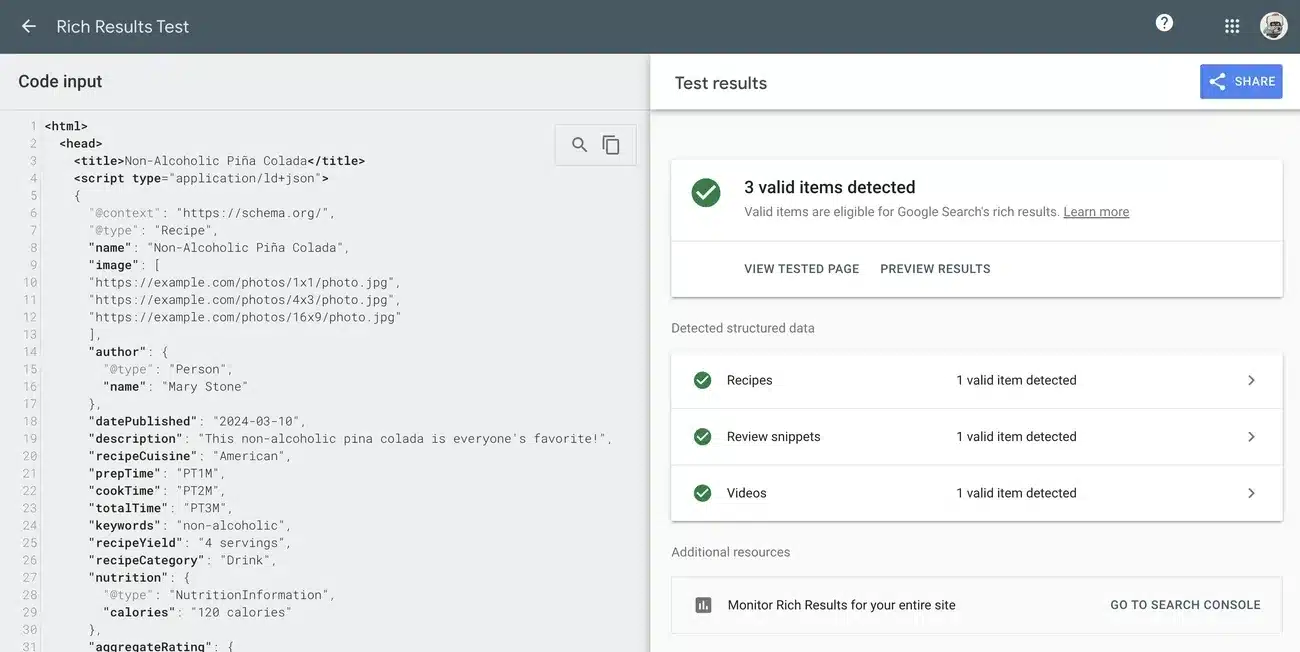
Image Source: Google for Developers
Your local business schema markup needs validation after setup. Testing properly will help you qualify for rich results and make sure everything works as planned.
Using Google’s Rich Results Test
Google’s Rich Results Test stands out as the official tool to validate structured data. This tool started as a way to preview rich results from your markup and now provides a complete analysis of your setup. Here’s how to use it:
Visit Google’s Rich Results Test website
- Enter your URL or paste your JSON-LD code directly
- Review which rich result types your page qualifies for
The tool shows if you have all required and recommended fields and points out any problems that need fixing. You’ll also see a preview of how your listing might look in search results.
Fixing common errors and warnings
Schema validation usually brings up two types of problems:
Errors need immediate attention because they stop rich results from showing up. Common examples include:
Missing required fields
Incorrect value types (using text where numbers are expected)
Syntax problems like missing commas or brackets
Warnings don’t matter as much but fixing them makes everything work better. These usually point out:
Missing recommended (but optional) properties
Ways to make your markup better
Ensuring schema matches visible content
Your schema must match what visitors see on your page. Search engines don’t like markup that points to hidden information. Google might penalize you with:
No more rich results
Lower trust signals
Manual actions against your site
Regular schema audits are needed whenever you update your webpage content to keep all information current and accurate.
Master Local Business Schema Markup
Local business schema markup helps business owners boost their digital presence. This piece explores how structured data acts like a translator between your website and search engines. It improves your visibility in local search results by a lot.
You’ll learn the difference between schema and structured data, plus how to pick the right schema type for your business. The piece also covers practical steps to create and implement markup using JSON-LD format-Google’s preferred method.
Rich results from schema markup perform better than standard listings. Studies show they get 58% more clicks compared to non-rich results. This makes schema implementation valuable for any local business owner.
Local Business Schema Markup With Additional Technical Complexities
The technical parts might look scary at first. However, schema generators and CMS plugins have made the process much easier. You can create effective markup that tells search engines about your business clearly, even without coding skills.
Testing plays a key role after implementation. Google’s Rich Results Test offers a great way to verify your schema and check if it qualifies for better search features. Make testing part of your regular website maintenance, especially after you update content.
The digital world keeps changing as voice search and AI-powered platforms become more prominent. Schema markup helps your business succeed with these new technologies while staying visible in regular search results.
Start with Small & Simple Local Business Schema Markup with DSG
Start small with simple business information schema. Then add reviews, operating hours, and other recommended properties gradually. This step-by-step approach lets you track results and improve your implementation over time.
Schema markup remains one of the most powerful yet underused tools in local SEO today. By doing this and being methodical, you’ll gain an edge over competitors in your local market. Your potential customers will find your business right when they need it most.
Local Business Schema Markup Made Simple FAQs
What is local business schema markup and why is it important?
Local business schema markup is a code format that provides search engines with structured information about your business, such as name, address, and hours. It’s important because it helps improve visibility in local search results, increases click-through rates, and makes your business eligible for rich results in search engine results pages.
How do I choose the right schema type for my business?
Choose the most specific LocalBusiness subtype that matches your business category. If no specific subtype fits, use the generic LocalBusiness type. Ensure the schema type aligns with your Google Business Profile category for consistency across platforms.
What are the essential properties to include in local business schema?
Essential properties include @id (unique identifier), name, address, @type (business category), telephone, logo, image, description, opening hours, website URL, and price range. Including these properties helps create more comprehensive rich results.
How do I implement schema markup on my website?
You can implement schema markup using JSON-LD format, which is Google’s preferred method. Place the code in the section of your HTML. For easier implementation, you can use schema generators or plugins if your website runs on a content management system like WordPress.
How can I test if my schema markup is working correctly?
Use Google’s Rich Results Test tool to validate your schema markup. Enter your URL or paste your JSON-LD code directly into the tool. It will show you which rich result types your page qualifies for and highlight any errors or warnings that need to be addressed.